# Basic Concepts and Terminology
This page introduces the basic concepts and terminology used in the `@tanstack/angular-form` library. Familiarizing yourself with these concepts will help you better understand and work with the library.
## Form Instance
A Form Instance is an object that represents an individual form and provides methods and properties for working with the form. You create a form instance using the `injectForm` function. The hook accepts an object with an `onSubmit` function, which is called when the form is submitted.
```typescript
const form = injectForm({
onSubmit: async ({ value }) => {
// Do something with form data
console.log(value)
},
})
```
## Field
A Field represents a single form input element, such as a text input or a checkbox. Fields are created using the `tanstackField` directive. The directive accepts a name prop, which should match a key in the form's default values. It also exposes a `field` named instance of the directive's internals that should be used via a template variable to access the field's internals.
Example:
```html
```
## Field State
Each field has its own state, which includes its current value, validation status, error messages, and other metadata. You can access a field's state using the `fieldApi.state` property.
Example:
```ts
const {
value,
meta: { errors, isValidating },
} = field.state
```
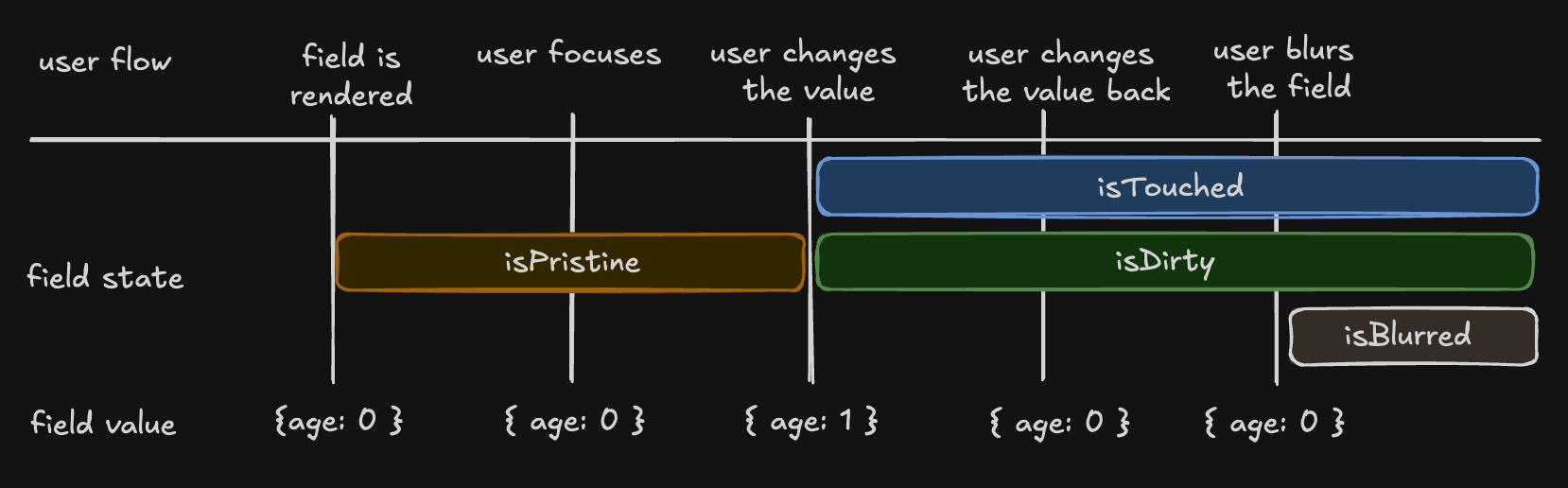
There are four states in the metadata that can be useful to see how the user interacts with a field:
- _"isTouched"_, after the user changes the field or blurs the field
- _"isDirty"_, after the field's value has been changed, even if it's been reverted to the default. Opposite of _"isPristine"_
- _"isPristine"_, until the user changes the field value. Opposite of _"isDirty"_
- _"isBlurred"_, after the field has been blurred
```ts
const { isTouched, isDirty, isPristine, isBlurred } = field.state.meta
```
## Understanding 'isDirty' in Different Libraries
Non-Persistent `dirty` state
- **Libraries**: React Hook Form (RHF), Formik, Final Form.
- **Behavior**: A field is 'dirty' if its value differs from the default. Reverting to the default value makes it 'clean' again.
Persistent `dirty` state
- **Libraries**: Angular Form, Vue FormKit.
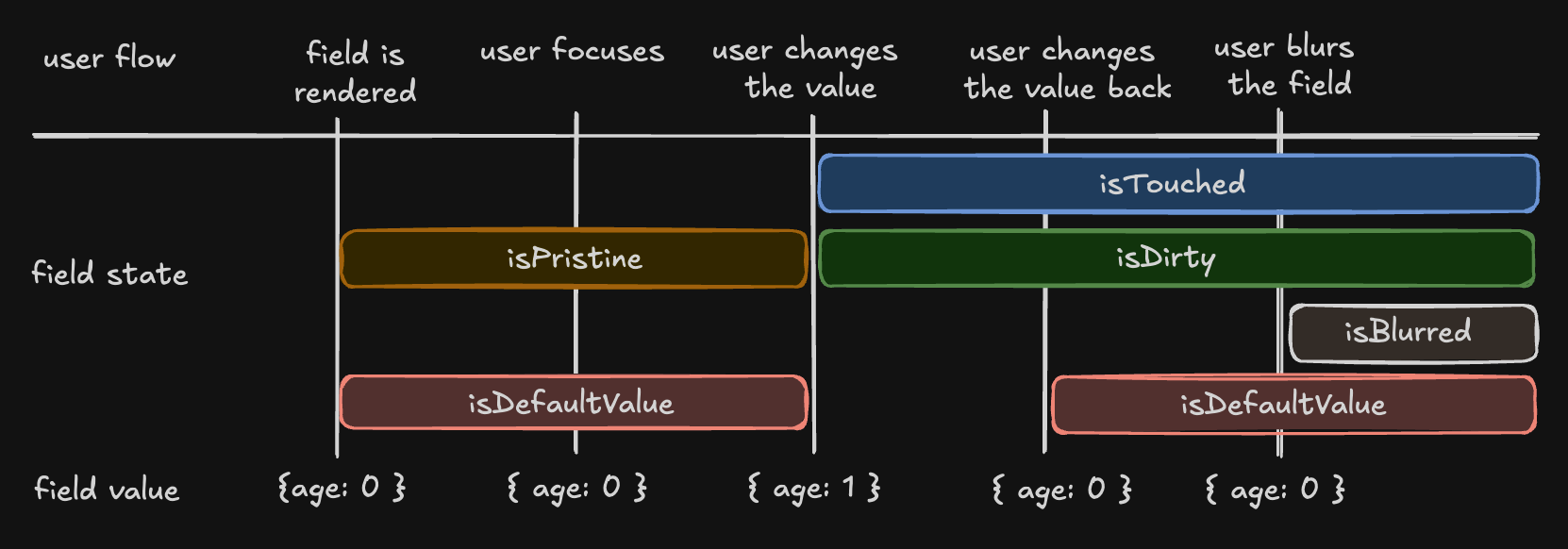
- **Behavior**: A field remains 'dirty' once changed, even if reverted to the default value.
We have chosen the persistent 'dirty' state model. To also support a non-persistent 'dirty' state, we introduce an additional flag:
- _"isDefaultValue"_, whether the field's current value is the default value
```ts
const { isDefaultValue, isTouched } = field.state.meta
// The following line will re-create the non-Persistent `dirty` functionality.
const nonPersistentIsDirty = !isDefaultValue
```
## Field API
The Field API is an object accessed in the `tanstackField.api` property when creating a field. It provides methods for working with the field's state.
Example:
```angular-html
```
## Validation
`@tanstack/angular-form` provides both synchronous and asynchronous validation out of the box. Validation functions can be passed to the `tanstackField` directive using the `validators` prop.
Example:
```angular-ts
@Component({
selector: 'app-root',
standalone: true,
imports: [TanStackField],
template: `
`,
})
export class AppComponent {
firstNameValidator: FieldValidateFn = ({
value,
}) =>
!value
? 'A first name is required'
: value.length < 3
? 'First name must be at least 3 characters'
: undefined
firstNameAsyncValidator: FieldValidateAsyncFn =
async ({ value }) => {
await new Promise((resolve) => setTimeout(resolve, 1000))
return value.includes('error') && 'No "error" allowed in first name'
}
form = injectForm({
defaultValues: {
firstName: '',
},
onSubmit({ value }) {
console.log(value)
},
})
}
```
## Validation with Standard Schema Libraries
In addition to hand-rolled validation options, we also support the [Standard Schema](https://github.com/standard-schema/standard-schema) specification.
You can define a schema using any of the libraries implementing the specification and pass it to a form or field validator.
Supported libraries include:
- [Zod](https://zod.dev/) (v3.24.0 or higher)
- [Valibot](https://valibot.dev/) (v1.0.0 or higher)
- [ArkType](https://arktype.io/) (v2.1.20 or higher)
- [Yup](https://github.com/jquense/yup) (v1.7.0 or higher)
Example:
```angular-ts
import { z } from 'zod'
@Component({
selector: 'app-root',
standalone: true,
imports: [TanStackField],
template: `
`,
})
export class AppComponent {
firstNameAsyncValidator = z.string().refine(
async (value) => {
await new Promise((resolve) => setTimeout(resolve, 1000))
return !value.includes('error')
},
{
message: "No 'error' allowed in first name",
},
)
form = injectForm({
defaultValues: {
firstName: '',
},
onSubmit({ value }) {
// Do something with form data
console.log(value)
},
})
z = z
}
```
## Reactivity
`@tanstack/angular-form` offers a way to subscribe to form and field state changes via `injectStore(this.form, selector)`.
Example:
```typescript
import { injectForm, injectStore } from '@tanstack/angular-form'
@Component(/*...*/)
class AppComponent {
form = injectForm(/*...*/)
canSubmit = injectStore(this.form, (state) => state.canSubmit)
isSubmitting = injectStore(this.form, (state) => state.isSubmitting)
}
```
## Listeners
`@tanstack/angular-form` allows you to react to specific triggers and "listen" to them to dispatch side effects.
Example:
```angular-ts
@Component({
selector: 'app-root',
standalone: true,
imports: [TanStackField],
template: `
`,
})
...
onCountryChange: FieldListenerFn = ({
value,
}) => {
console.log(`Country changed to: ${value}, resetting province`)
this.form.setFieldValue('province', '')
}
```
More information can be found at [Listeners](./listeners.md)
## Array Fields
Array fields allow you to manage a list of values within a form, such as a list of hobbies. You can create an array field using the `tanstackField` directive.
When working with array fields, you can use the fields `pushValue`, `removeValue`, `swapValues` and `moveValue` methods to add, remove, swap, and move a value from one index to another within the array, respectively. Additional helper methods such as `insertValue`, `replaceValue`, and `clearValues` are also available for inserting, replacing, and clearing array values.
Example:
```angular-ts
@Component({
selector: 'app-root',
standalone: true,
imports: [TanStackField],
template: `
Hobbies
@if (!hobbies.api.state.value.length) {
No hobbies found
}
@for (_ of hobbies.api.state.value; track $index) {
}
`,
})
export class AppComponent {
defaultHobby = {
name: '',
description: '',
yearsOfExperience: 0,
}
getHobbyName = (idx: number) => `hobbies[${idx}].name` as const;
getHobbyDesc = (idx: number) => `hobbies[${idx}].description` as const;
form = injectForm({
defaultValues: {
hobbies: [] as Array<{
name: string
description: string
yearsOfExperience: number
}>,
},
onSubmit({ value }) {
alert(JSON.stringify(value))
},
})
}
```
These are the basic concepts and terminology used in the `@tanstack/angular-form` library. Understanding these concepts will help you work more effectively with the library and create complex forms with ease.